Sunday, January 5, 2025

AutoGen Studio by Microsoft


AutoGen Studio

A Low-Code Interface for AI Agent Development


Introduction

AutoGen Studio is a low-code platform designed to streamline the creation and management of AI agents. Built on top of the AutoGen framework, it empowers developers to quickly prototype, enhance, and deploy intelligent agents for diverse applications.

This guide offers a step-by-step walkthrough of AutoGen Studio, covering its installation, features, and future roadmap.

Installation

Getting Started with AutoGen Studio

Choosing Your Installation Method

AutoGen Studio provides two installation pathways:

  • Installation from PyPi: This is the recommended method for most users, especially those who are new to the platform. It offers a simplified installation process without requiring in-depth technical knowledge.
  • Installation from Source: This method is ideal for developers who want to customize or contribute to the source code of AutoGen Studio. It requires familiarity with React and involves compiling the frontend interface.

Detailed Installation Steps

Install from PyPi:

  1. Set up a Virtual Environment: Using a virtual environment like conda is highly recommended to prevent conflicts with existing Python packages.
  2. Activate Python: Ensure that Python 3.10 or a newer version is active within your virtual environment.
  3. Install AutoGen Studio: Use the pip package manager to install AutoGen Studio with the following command:
    # pip install autogenstudio

Install from Source:

  1. Prerequisites: Ensure that you have Python 3.10+ and Node.js (version 14.15.0 or higher) installed on your system.
  2. Clone the Repository: Clone the AutoGen Studio repository to your local machine.
  3. Install Python Dependencies: Navigate to the root directory of the cloned repository and install the required Python dependencies using:
    # pip install -e .
  4. Install Frontend Dependencies: Navigate to the 'samples/apps/autogen-studio/frontend' directory and install the necessary packages by following bash commands:
    # npm install -g gatsby-cli
    # npm install --global yarn
    # cd frontend
    # yarn install
    # yarn build

For Windows Users:

To build the frontend on Windows, you might need to modify the build commands.

gatsby clean && rmdir /s /q ..\\autogenstudio\\web\\ui 2>nul & (set \"PREFIX_PATH_VALUE=\" || ver>nul) && gatsby build --prefix-paths && xcopy /E /I /Y public ..\\autogenstudio\\web\\ui

Running the Application: Bringing AutoGen Studio to Life Starting the Application

Once the installation is complete, launch the AutoGen Studio web UI by executing the following command in your terminal:
# autogenstudio ui --port 8081

Accessing the UI: Open your web browser and navigate to http://localhost:8081/ to start using AutoGen Studio.

Customizing the Application

AutoGen Studio offers various command-line arguments to customize the application according to your preferences:

  • --host <host> : Specifies the host address (default is localhost).
  • --appdir <appdir> : Defines the directory where the application data (database, user files) is stored. By default, it is set to the .autogenstudio directory in your home directory.
  • --port <port> : Sets the port number for the application (default is 8080).
  • --reload : Enables automatic reloading of the server when code changes are detected (default is False).
  • --database-uri : Specifies the database URI (e.g., SQLite, PostgreSQL). By default, it uses a database.sqlite file in the --appdir directory. Example values include sqlite:///database.sqlite for SQLite and postgresql+psycopg://user:password@localhost/dbname for PostgreSQL

Exploring AutoGen Studio’s Capabilities

Key Features

AutoGen Studio offers a range of features to facilitate AI agent development:

  • Agent Construction and Configuration: Build and configure agents using predefined workflows like `UserProxyAgent` and `AssistantAgent`. Customize agent settings such as skills, temperature, and models.
  • Workflow Composition: Combine multiple agents into sophisticated workflows to automate complex tasks.
  • Interactive Chat Interface: Interact with agents in real-time to test their capabilities and provide feedback.
  • Message and Output Visualization: View agent messages and output files within the UI for easy monitoring and analysis.

Future Roadmap

Expanding AutoGen Studio’s Horizons

AutoGen Studio is actively evolving, with plans to introduce new features and enhancements:

  • Enhanced Agent Workflows: Support for more complex agent workflows like `GroupChat` and `Sequential` workflows.
  • Improved User Experience: Features such as streaming intermediate model output and better summarization of agent responses.
  • Expanded Capabilities: Continuously adding new features based on user feedback and community contributions.

For detailed information on the project's roadmap and current issues, please refer to the AutoGen Studio GitHub repository.

Contributing to AutoGen Studio

Shaping the Future of AI Development

Contribution Guidelines

Contributions to AutoGen Studio are highly encouraged. To effectively contribute:

  1. Review the AutoGen Contribution Guide: Familiarize yourself with the general contribution guidelines for the AutoGen project.
  2. Explore the Roadmap: Understand the project’s priorities and identify areas where your contribution can be most impactful. Contributing to issues tagged with 'help-wanted' is especially appreciated.
  3. Initiate a Discussion: Discuss your proposed contribution on the relevant roadmap issue or create a new issue for discussion.
  4. Use the 'dev' Branch: Base your contributions on the 'dev' branch to ensure alignment with the latest changes.
  5. Submit a Pull Request: now qqqSubmit a well-documented pull request with your contribution.
  6. Leverage the Devcontainer: For modifications to AutoGen Studio, utilize the provided devcontainer. Instructions can be found in `.devcontainer/README.md`.
  7. Use the 'studio' Tag: Tag issues, questions, and PRs related to AutoGen Studio with the 'studio' tag for effective tracking.

Security Considerations

A Note on Production Environments

Important Disclaimer

AutoGen Studio is a research prototype and is not intended for production environments. While it encourages some baseline security practices (e.g., using Docker for code execution), it does not implement comprehensive security features.

Recommendations for Production Applications

For building production-ready applications, it is strongly advised to use the AutoGen framework directly and implement necessary security measures such as rigorous testing, access control mechanisms, and other security best practices.

Acknowledgements

AutoGen Studio is built on the foundation of the AutoGen project and was adapted from a research prototype developed in October 2023.

Saturday, January 4, 2025

Foundation Models, How they work, and why they are so important in Artificial Intelligence


Foundation Models The Backbone of Generative AI


Generative AI has transformed the way we interact with technology. From creating conversations and stories to generating images and music, this revolutionary technology is powered by Foundation Models (FMs) Large-scale machine learning models pretrained on vast datasets. In this article, we’ll break down the basics of FMs, how they work, and why they are so important in the world of artificial intelligence.

What Are Foundation Models?

Foundation Models are a type of machine learning model specifically designed to handle a wide range of tasks. Unlike traditional AI models that specialize in one task, FMs are general-purpose, capable of performing multiple tasks like text generation, summarization, chatbot interactions, and image generation.


Key Examples of Foundation Models:

FMs are typically pretrained on massive datasets using a technique called self-supervised learning or reinforcement learning, making them incredibly versatile and powerful.

How Do Foundation Models Work?

Self-Supervised Learning: A Game-Changer

Unlike traditional machine learning methods that require labeled data, self-supervised learning enables FMs to learn from unlabeled datasets. By analyzing the inherent structure of the data, the model generates its own labels, which reduces dependency on human intervention.

For example, a foundation model might predict missing words in a sentence or understand the context of words based on their placement in a dataset.

Training, Fine-Tuning, and Prompt Engineering

FMs undergo several stages of development to improve their performance:

1. Pretraining

In this stage, the model learns patterns and relationships within large datasets using self-supervised learning or Reinforcement Learning from Human Feedback (RLHF). RLHF uses feedback from humans to fine-tune the model's behavior, ensuring it aligns with human preferences.

2. Fine-Tuning

Fine-tuning enhances a foundation model's capabilities for specific tasks. By introducing smaller, focused datasets, the model can adapt to niche areas such as medical research or finance. Two common methods of fine-tuning include:

  • Instruction Fine-Tuning: Using examples to teach the model how to respond to specific instructions.
  • RLHF Fine-Tuning: Incorporating human feedback to improve performance.

3. Prompt Engineering

Prompt engineering involves crafting precise instructions for the model without altering its underlying structure. It is an efficient alternative to fine-tuning and doesn’t require labeled datasets or advanced infrastructure.

Types of Foundation Models

FMs can be broadly categorized based on their functionality:

1. Text-to-Text Models

Text-to-text models, also known as Large Language Models (LLMs), are designed to process and generate human language. They can:

  • Summarize text
  • Extract information
  • Answer questions
  • Create content like blogs or product descriptions

Natural Language Processing (NLP)


At the core of text-to-text models lies NLP, which enables machines to understand and manipulate human language. Traditional NLP involved steps like tokenization and sentiment analysis, but modern FMs bypass these steps, making the process more efficient.

Recurrent Neural Networks (RNNs)


Earlier NLP systems relied on RNNs, which store and process sequential data. While RNNs were useful, they had limitations like slow training times and an inability to parallelize tasks effectively.

Transformers The Foundation of LLMs


Transformers revolutionized FMs by allowing parallel processing of data. They consist of an encoder (to process input data) and a decoder (to generate output). Modern FMs typically use only the decoder component, enabling faster and more accurate text generation.

2. Text-to-Image Models


Text-to-image models transform written descriptions into high-quality images. Some popular text-to-image models include:

  • DALL-E 2 (OpenAI)
  • Imagen (Google Research)
  • Stable Diffusion (Stability AI)
  • MidJourney

Diffusion Architecture

Text-to-image models use a diffusion process that involves two steps:

1. Forward Diffusion: Adds noise to an image until it becomes unrecognizable.

2. Reverse Diffusion: Gradually removes noise while incorporating textual input, resulting in a new, high-quality image.

Why Are Foundation Models Important?

Foundation models are transforming industries by enabling advanced AI applications. Their adaptability and scalability make them ideal for everything from customer service chatbots to personalized content creation and even complex scientific research.

By understanding how FMs work, businesses and developers can unlock the full potential of generative AI, creating more innovative and human-centric technologies.

Foundation models are the cornerstone of modern generative AI, offering limitless possibilities for creativity and problem-solving.

Whether you’re a beginner or an experienced developer, understanding the basics of FMs can open the door to exciting new opportunities in artificial intelligence.

Machine Learning
Large Language Models


Friday, January 3, 2025

AI Powered Brain Computer Interface Decodes Speech in real-time from Brain Signals


World’s First Mind-to-AI Large Model Dialogue

Decoding Chinese Speech with Brain-Computer Interface in real-time from brain signals


A Chinese startup has achieved a groundbreaking milestone in the field of brain-computer interface (BCI) technology, successfully decoding Chinese speech in real-time from brain signals.

This breakthrough has the potential to revolutionize the lives of individuals with speech impairments and open up new avenues for human-computer interaction.

The Power of BCI

Bridging the Gap Between Brain and Machine

BCI technology allows for direct communication between the brain and external devices, bypassing the need for traditional physical interfaces like keyboards or voice commands.

This is achieved by implanting a device that records brain signals, which are then decoded by sophisticated algorithms to understand the user’s intentions.


Decoding Chinese Speech

A Complex Linguistic Challenge

The recent breakthrough by NeuroXess, a Shanghai-based startup, focused on decoding Chinese speech, a particularly complex task due to the language’s unique characteristics. Unlike alphabetic languages like English, Chinese is monosyllabic, tonal, and logographic, requiring the use of more brain regions for processing.

AI’s Crucial Role

Training Neural Networks to Understand Brain Signals

Artificial intelligence (AI) plays a vital role in deciphering the complex neural patterns associated with speech. NeuroXess researchers trained a neural network model using electrocorticogram (ECoG) features extracted from the high-gamma band of brain signals. This high-frequency band (70-150 hertz) is known to correlate with complex cognitive functions, including movement and sensory information, making it ideal for decoding intentions.

Clinical Trials Show Promising Results

In a clinical trial, a patient with a tumor in the language area of the brain received a 256-channel BCI implant. Within five days, the patient achieved 71% speech decoding accuracy using 142 common Chinese syllables, with a decoding latency of under 100 milliseconds per character. This marks the highest level of real-time Chinese speech decoding achieved in China.

Beyond Speech Expanding the Possibilities of BCI

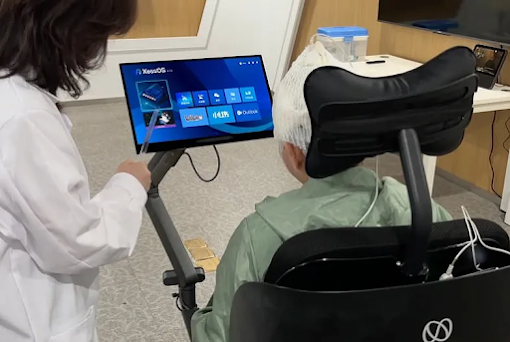
The potential applications of BCI technology extend far beyond speech decoding. NeuroXess’s BCI device has also been successfully used to control software, operate smartphones, control smart home systems, and even maneuver a wheelchair, all through brain signals. In another clinical trial, a patient with a brain injury used the BCI to control robotic hands, grasp objects, and even perform sign language.

The company envisions a future where BCI technology empowers individuals with speech or motor function disabilities resulting from conditions like Amyotrophic Lateral Sclerosis (ALS), high-level paraplegia, and stroke.

Mind-to-AI Dialogue A Glimpse into the Future


Perhaps the most exciting prospect is the potential for direct communication between the human mind and AI models.

NeuroXess has demonstrated the world’s first "mind-to-AI large model" dialogue, where a patient used the BCI to control a digital avatar and interact with an AI model. This breakthrough opens up possibilities for seamless integration between human thought and advanced AI systems.

While BCI technology is still in its early stages, these recent advances demonstrate its immense potential to transform human lives and redefine the boundaries of human-computer interaction. The future holds exciting possibilities as AI continues to play a critical role in unlocking the secrets of the human brain and translating thoughts into actions.

Google Antigravity: The Agentic Development Platform Revolutionizing AI-Powered Coding

What is Google Antigravity? A New Era in Agent-First Development   Google Antigravity represents Google's bold vision for the future of ...